Graduating to no-code automation
Chat-based agents (Claude Projects, ChatGPT GPTs, Gemini Gems) are excellent for tasks you do when you have ChatGPT open in front of you. They have an obvious limit: they require you to be there, paste the input, copy the output, and move it to the next system. For tasks that should run on their own schedule, pull from your existing tools, and write to your existing tools, you need the next step up: no-code workflow automation.
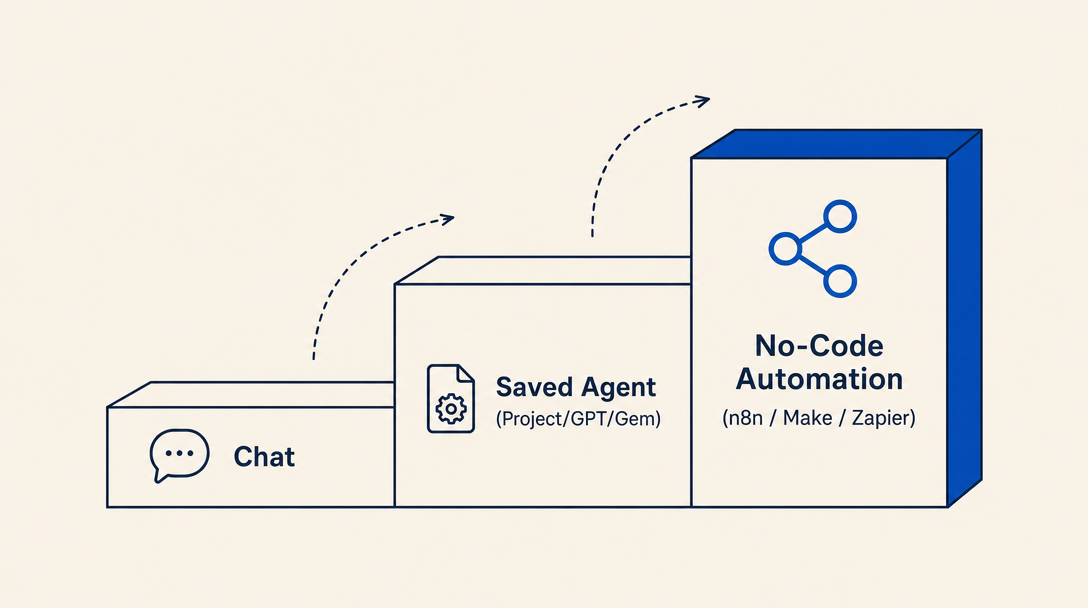
When chat hits its limit
Three signs you have outgrown chat-based agents:
- You are doing the same chat task repeatedly on a schedule. Every Monday morning you paste the same data, run the same prompt, copy the output. That is a workflow, not a chat.
- You are manually moving data between tools. Email arrives → you summarize in ChatGPT → you paste into a spreadsheet → you send a reply. That whole loop should run by itself.
- The task fails when you are not present. If a customer email needs a response within an hour and you are at lunch, chat-based agents do not help.
When you hit any of these, you are ready for no-code automation.
The three main no-code automation tools
| Tool | Strength | Israeli context |
|---|---|---|
| n8n | Open-source, self-hostable, free for personal use; the most flexible | Excellent for Israeli setups because you can self-host on Israeli servers and integrate with local APIs (israeli-bank-scrapers, Morning, data.gov.il) |
| Make.com (formerly Integromat) | Visual builder, large library of pre-built integrations, good free tier | Strong on Israeli SaaS integrations (Morning, iCount, Monday.com, Cardcom, Tranzila) |
| Zapier | The most app integrations of any tool, easiest to start with | Less Israel-specific coverage but excellent for cross-app workflows (Gmail, Calendar, Slack, Notion, Airtable) |
All three let you build automation visually: trigger ("when a new email arrives") connects to action ("summarize via AI") connects to action ("write to spreadsheet") connects to action ("send Slack notification"). You drag boxes; you do not write code.
Israeli use cases that fit each tool
n8n use cases for Israeli users:
- Pull Bank Hapoalim transactions daily via israeli-bank-scrapers, categorize them via AI, write to a Google Sheet
- Monitor a gov.il portal for new tender publications, AI-summarize each one, send to a Slack channel
- Pull invoices from Morning, AI-extract line items, sync to your accounting workflow
Make.com use cases:
- New row in Google Sheets → AI generates Hebrew marketing copy → schedule to LinkedIn at Israeli business hours
- WhatsApp Business message arrives → AI classifies as support/sales/spam → routes accordingly
- New Monday.com task assigned → AI drafts Hebrew kickoff email → sends from your Gmail
Zapier use cases:
- Calendly booking → AI personalizes a Hebrew confirmation email → sends via Gmail
- Stripe payment → AI generates a Hebrew receipt with Israeli VAT formatting → emails to customer
- New Notion page → AI translates to Hebrew → saves as a second Notion page
The tradeoff: setup time vs. ongoing value
Chat-based agents take minutes to set up and require you to be present. No-code automation takes hours to set up the first time and runs without you forever after. The breakeven is roughly: if you are doing the same chat task more than twice a week, the no-code version pays back its setup time within a month.
Recommended starting points for non-technical users
Start with Make.com or Zapier. Both are fully cloud-hosted (nothing to install) and built for non-developers. The make-com-israeli-automations skill (npx skills-il add developer-tools/make-com-israeli-automations) covers the Israeli ecosystem on Make.com (Morning, iCount, Monday.com, Cardcom, Tranzila). For Zapier, the visual builder and its 7,000+ app library let you start with no skill required at all.
n8n is a developer-leaning option. Self-hosting n8n requires comfort with Docker or a server you can administer. If you have a developer on call (or are willing to use a managed n8n cloud service), the n8n-hebrew-workflows skill (npx skills-il add developer-tools/n8n-hebrew-workflows) covers Israeli integrations like israeli-bank-scrapers, Morning, and data.gov.il. For a non-technical reader without dev support, Make.com and Zapier are the realistic on-ramp.
For a concrete worked example of a deployed AI-powered Israeli automation (customer support), see the israeli-customer-support-automator skill (npx skills-il add communication/israeli-customer-support-automator). It walks through a real production setup: Hebrew ticket classification, SLA management for Sunday-Thursday business hours, escalation rules per Israeli consumer protection law.
The most common mistake in Chapter 6
Trying to build a complex automation before doing the task manually with a chat-based agent first. You do not yet know the edge cases, the variations, the decision points. Run the task manually in Claude / ChatGPT / Gemini for two weeks first. Notice what surprises you. THEN build the automation, because now you know what to automate.
The chat-based phase is not a stepping stone you are eager to leave behind. It is the discovery phase that makes the automation actually useful. Skip it and you will build an automation that runs perfectly but does the wrong thing.
Closing
You now have a working mental model of AI agents, three platforms to choose between, four prompt patterns that actually produce useful output, four worked Israeli use cases to adapt, a failure-mode taxonomy with a verify protocol, and a clear next step if you want to graduate to no-code automation. The Israeli AI conversation is loud and confusing; the work itself is not. Pick one use case from Chapter 4 that matches your situation. Set it up on whichever platform from Chapter 2 fits how you work. Run it on real tasks for a week. The picture becomes clear quickly when you stop reading about AI and start using it.
Want to keep reading?
Sign in to unlock the rest of the course and track your progress.