Prompt patterns that turn a chat into an agent
A chat is what you do when you ask a question. An agent is what you get when you encode a prompt so well that it produces useful work on the first try, every time, on any new input. The difference is the pattern. There are four patterns worth learning; once you know them, you can mix them.
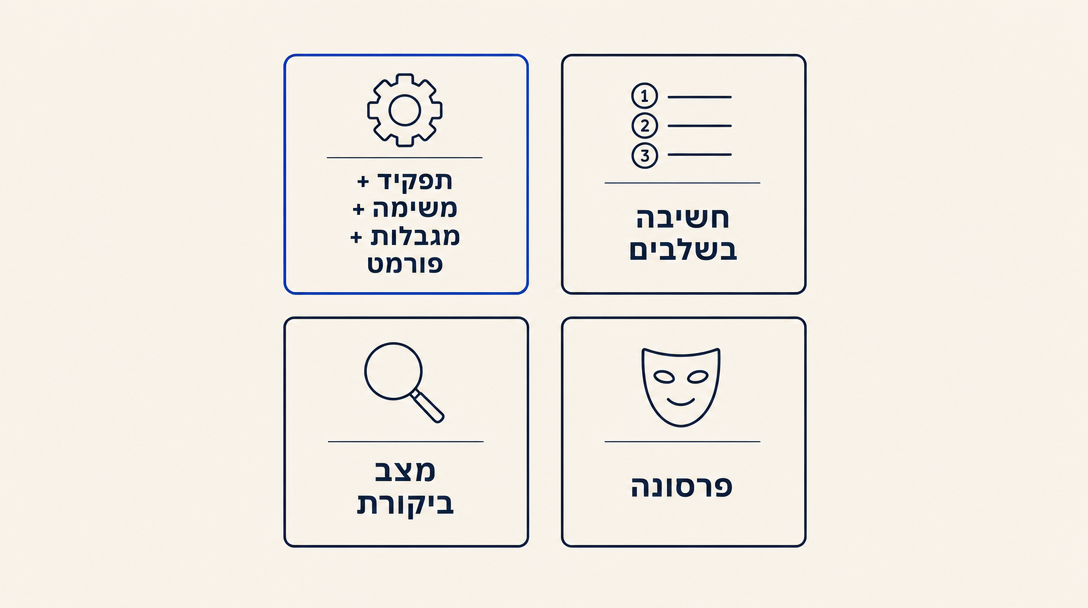
Pattern 1: Role + Task + Constraints + Format
This is the foundation. Every good agent prompt has these four parts, in roughly this order.
"You are an Israeli accountant specializing in freelancers. (ROLE) Read this list of invoices and produce a monthly VAT report draft, with one row per invoice plus a totals row. (TASK) Use 2026 VAT rate 18%. Exclude exempt categories. Flag anything over ₪10,000 for review. (CONSTRAINTS) Output as a Markdown table with columns: invoice date, client, amount net, VAT, amount gross, exempt yes/no, flag. (FORMAT)"
The constraints are what most beginners miss. Without them, the AI guesses what you want. With them, it produces something you can drop straight into your workflow. Constraints turn a guess into a deliverable.
Pattern 2: Step-by-step thinking
When a task is complex, ask the AI to think through it explicitly before producing the answer. The output usually improves by 30 to 50 percent because the model effectively "shows its work" before committing.
"Before drafting the contract, list the 5 most important clauses for this specific scenario and explain in one sentence each why this scenario needs it. Then write the contract."
This works because asking the AI to reason out loud first surfaces missing context (you may notice it does not know whether you want IP transferred to the client or retained, and you can fix that before the contract draft).
Pattern 3: Critique mode
Have the AI critique its own output, then improve it. This often catches errors faster than you would.
"Now read the contract you just drafted and list the 3 weakest clauses, the 2 most ambiguous sentences, and any clause that is missing entirely for this scenario. Then produce a revised version."
The critique step costs you nothing but a second prompt; the revised version is often noticeably better.
Pattern 4: Persona
Sometimes the role you want is not just "an accountant" but a specific personality and style. A persona prompt encodes both expertise AND voice.
"You are an Israeli marketing manager with 10 years at consumer SaaS startups. You write in a direct, no-fluff style. You prefer concrete examples over generic advice. You avoid hype words. Critique this landing page copy with that voice."
The persona pattern is what makes the difference between AI output that sounds like everyone else's AI output and AI output that sounds like a specific real person you would want to work with.
Hebrew-specific tips
The biggest Hebrew-specific patterns:
- When the SOURCE is Hebrew, work in Hebrew. If you are summarizing a Hebrew document, write your prompt in Hebrew. The model handles same-language work better than cross-language.
- When the SOURCE is English but the OUTPUT must be Hebrew, ask explicitly. "Write the output in Hebrew" is not enough. "Write the output in natural Israeli Hebrew, suitable for a [specific audience]" produces dramatically better results.
- For bilingual outputs, separate the languages explicitly. "First write the response in Hebrew. Then write a short English summary."
- For Hebrew that ends up in a formal document, ask the agent to write a draft, then critique its own Hebrew naturalness (Pattern 3), then produce a revised version. Native Israeli readers detect translation-smell instantly; this two-pass approach catches most of it.
The most common mistake in Chapter 3: vague tasks. "Help me with this email" produces generic output. "Draft a 100-word formal Hebrew reply to this client complaint, acknowledging the issue, offering one concrete solution, and inviting a phone call" produces something you can send. The constraints are not optional; they are the prompt.
Want to keep reading?
Sign in to unlock the rest of the course and track your progress.