Sharing your skill
You have written SKILL.md, optionally added references/ and scripts/, and the skill works. Now the practical question: how do you actually use it, share it with others, or publish it to a catalog? This chapter covers four scenarios in order of effort.
Scenario A: Personal skill, local only
The simplest use: keep the skill on your own machine. Most hosts that support the skill format let you install a skill from a local folder. For example, in Claude Code:
claude skill install /path/to/your-skill-folder
That is it. The skill is now available in your Claude Code sessions. No publication, no review, no catalog. Personal skills are perfectly valid and often the best fit for skills that are specific to YOUR workflow.
Scenario B: Share with a team or a friend
You want a colleague to use your skill. Two common patterns:
- Zip the folder, send it. They unzip, install locally with
claude skill install /path/to/your-skill-folder. Works for any audience, no infrastructure needed. - Push to a private git repo. They clone, install from the local clone. Easier to keep in sync as you iterate; works well for a team.
Both approaches assume the recipient knows how to install a local skill on their host. For non-developer audiences, a public catalog (Scenario D) is often easier.
Scenario C: Internal company catalog
If your team or company has a shared internal catalog (an internal directory of skills your engineers can install from), follow your organization's contribution process. Common patterns: PRs to an internal git monorepo, a private npm registry, or a custom internal install script. The skill content is unchanged; only the distribution mechanism differs.
Scenario D: Publish to a public catalog
If your skill is useful to people beyond your team, consider a public catalog. The two main options as of 2026:
- The Anthropic skill registry (when generally available), the canonical place for general-purpose skills.
- Topic-specific community catalogs. The Israeli-context catalog skills-il (https://agentskills.co.il) accepts community submissions for skills relevant to Israeli users (Hebrew, Israeli APIs, Israeli law). Other community catalogs exist for other niches.
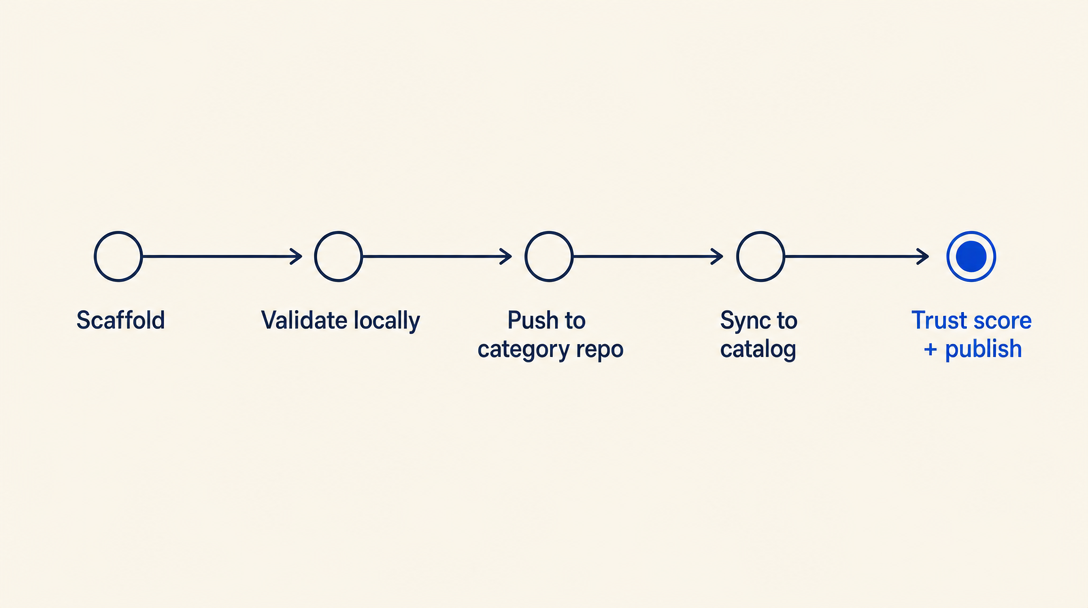
The contribution process varies per catalog. Most public catalogs ask for: the SKILL.md folder, a description of what your skill does, and some form of review (automated lint + human signoff). Catalogs that ship bilingual content (like skills-il) ask for a SKILL_HE.md companion and a metadata.json for catalog-specific display data. Read the catalog's contribution guide before submitting.
Validation checklist before sharing
Whichever scenario you pick, a quick local sanity-check saves embarrassment:
- YAML frontmatter has
name,description, andlicense; no extra nested keys - The
namefield equals the folder basename - Any files you reference from SKILL.md in
references/orscripts/actually exist in the folder - The description has a clear "Use when..." pattern AND a "Do NOT use for..." clause
- If you have multiple language versions or
metadata.jsonfor a catalog, they are internally consistent (slugs match, no missing translations) - Run the skill yourself on a fresh Claude Code session and verify it loads and behaves as expected
Versioning + change tracking
When you update your skill, bump a version somewhere (either a version field in your frontmatter, or in metadata.json if you have one, or a git tag). Semver works well: patch (0.0.X) for fixes, minor (0.X.0) for additions, major (X.0.0) for breaking changes or scope shifts.
For public catalogs, the catalog will usually handle changelog distribution to your skill's followers. For personal or team skills, keeping a simple CHANGELOG.md next to your SKILL.md is enough.
The most common mistake in Chapter 5: shipping a skill update without bumping the version. Consumers of your skill (or your future self) cannot tell what changed. Always bump the version; always note what changed in one sentence somewhere.
Want to keep reading?
Sign in to unlock the rest of the course and track your progress.